 From the desk of David Cameron Gikandi, author of A Happy Pocket Full of Money and Creative Consultant on The Secret
For online businesses doing $100K–$3M
Tell it your numbers once. Every answer starts from them.
StrategyOS is an AI business strategist. It keeps your whole business on file—every number and every decision. Ask it anything. It works from your real numbers, shows its work, and names the one thing to fix next.
The biggest calls in your business get made by one person, at the end of a long day.
Dear friend,
You’ve built something real. People pay you, and new ones keep finding you. There may be a small team counting on you, too. Getting an online business past six figures is hard, and you did it.
But the hard part changes as you grow, and now it’s the decisions. What should you charge? Which offer should you push? Is it time to hire? Why do people book a call and then not buy? Most of those questions get answered late, after everything else is done.
Let me show you one of those nights. The woman in it is made up, and so is her business. We set it up for the film and the screens on this page. Let’s call her Nina.
Nina owns a small marketing agency with a team of nine. Sales are up this year. But profit has dropped by almost half, and her team is worn out.
It’s 9:40 at night. The office is empty, and she’s still at her desk. An offer letter sits in front of her, ready to sign. It’s for a senior hire at $95,000 a year, and there’s no one left to ask.

She thinks she knows the answer already: sign it. The team is stretched, so she needs more hands. And a small voice in her head says what it always says.
“I should hire someone. Can I afford to be wrong about who?”
That’s no failing of hers, or of yours. Most of the help out there wasn’t built for 9:40 at night. General AI chat will answer anything, but it only knows what you remember to tell it. A good coach helps too. But a coach costs thousands a year, and part of every session goes on catching them up.
Hold on to that night. We’ll come back to Nina’s desk later, and you’ll see what she did.
I know that kind of night from the inside. For years, I made the big calls in my own business alone.
Then, a few years before 2022, it all came down. I had stacks of bills and late payments. And by then I had been the Creative Consultant on The Secret. I had written A Happy Pocket Full of Money, an international bestseller. I could help so many people, and I was broke.
I kept asking myself how I could help so many others while I stayed stuck. I thought I was doing everything right. I was wrong, and I didn’t even know it.
Money was where the old fear showed the most. Somehow, I’d cut myself off from money. Then one missed payment would fill me with the same terror I felt as a child.
And I carried all of it alone. I learned that early, growing up in Kenya. After the hard moments at home, nobody asked if I was OK. It was always, “It’s okay. David can take it.” I grew up carrying everything myself, and later my business, too. I once wrote it down as “hyper-independence to the point of loneliness.”
When I said I wanted a life in business, my father said my interests didn’t matter. Then he set up dinners with men whose businesses had failed. They were there to tell me business was hopeless.
That warning came with me into my own business. A lot of us carry a warning like it, and we still hear it each time we back ourselves.
It took me years to see the pattern. I wanted someone to give me a straight answer, and nobody did. Slowly, I learned to notice it, and the more I saw, the freer I became. At fifty, I was mostly free of it.
A big call goes better with two things at the table. One is your real numbers. The other is someone who knows them and will tell you straight. At 9:40 at night, that second thing is usually missing.
StrategyOS is built to be that second thing. Stay with me for a few minutes, and I’ll walk you through it in order, one step at a time. Before I sign off, I’ll tell you why I built it.
What helps: a strategist who already knows your numbers
First, the idea, in plain words. StrategyOS is a strategist who already knows your numbers. And it’s there the moment a question comes up, even at 9:40 at night.
You talk to it in your own words, at any hour of the day or night. Every answer begins with what it already knows about your business. You never start from zero.
Behind it sits a set of 48 business frameworks. It uses them to think a problem through, then gives you a plain answer from your own figures.
What it knows comes from three places:
- Public material from the world’s top consulting firms
- The best of today’s thinking on how to build a business
- My own 20+ years of experience
What’s inside StrategyOS
Now for the parts: here’s everything that’s in it today. You don’t need to learn them first, because you’ll meet each one as you use it.
It remembers your business
It keeps your margins, your last price change and the decision you were weighing. Come back months later and it still knows. You can search every conversation you’ve had with it, too.
It shows its work
Under each answer, it shows which of your numbers it used. It says why it ruled the other options out. And if the facts don’t back your plan, it tells you, plainly and kindly.
Get a second opinion
Tap Get a second opinion under an answer. It argues against its own advice, using the same numbers. Then you can see if the advice still holds up.
It reads your files
Upload a P&L, a sales proposal, an ad report or a deck saved as a PDF. Word, CSV and plain text files work too. Add up to 5 at a time, and it works from what’s in them.
It turns your target into a plan
When the thinking has settled, it offers once to build a plan. It turns your target into simple sums: customers a week and calls a day. It names the one lever that moves the number most. Then it sets your first 3 to 5 actions, each with a date. Say yes and lock it in. From then on, it checks on each action.
PDFs you can keep
There are 2 kinds. One is a strategic assessment: a written report on what you talked through. The other is your action plan. Each takes one tap. Tap Get this as a strategic assessment (PDF) under a conversation, or Download as PDF on your plan.
Your decisions, on the record
When you decide something, it writes it down. It notes what would show the decision was wrong, and when to check. When you guess what will happen, it notes how sure you are. When you test something, it writes down what success looks like. Later, it asks how each one turned out.
It notices when advice goes out of date
Go back to a conversation that an assessment came from, and add something new. It marks that assessment out of date. Within a day, it writes a fresh one. So an old answer never passes for a new one.
A strategy score
It gives your business a strategy score out of 100. Once your dashboard shows up, it also scores 6 parts of the business, like your price, your offer and growth. So you can see which part holds the rest back.
A dashboard, once it has something true to say
The dashboard shows up once 3 things are true. You’ve been with it for 14 days. You’ve sent it at least 5 messages. And you’ve answered the questions it asks when you sign up. Then you get one page with the score for each of the 6 parts, beside your plan and your decisions. About a month after that, it adds a chart of how your score has moved, and your latest assessments, kept up to date.
It follows up
You get a weekly briefing: 2 or 3 sentences on your next action. It also reminds you when an action is due. You pick how often it checks in, and at what hour.
How you get started
That’s what’s inside, so now for how you start. Getting started has 4 steps, in this order. The first one takes a few minutes, and after that you just talk.
Tell it about your business
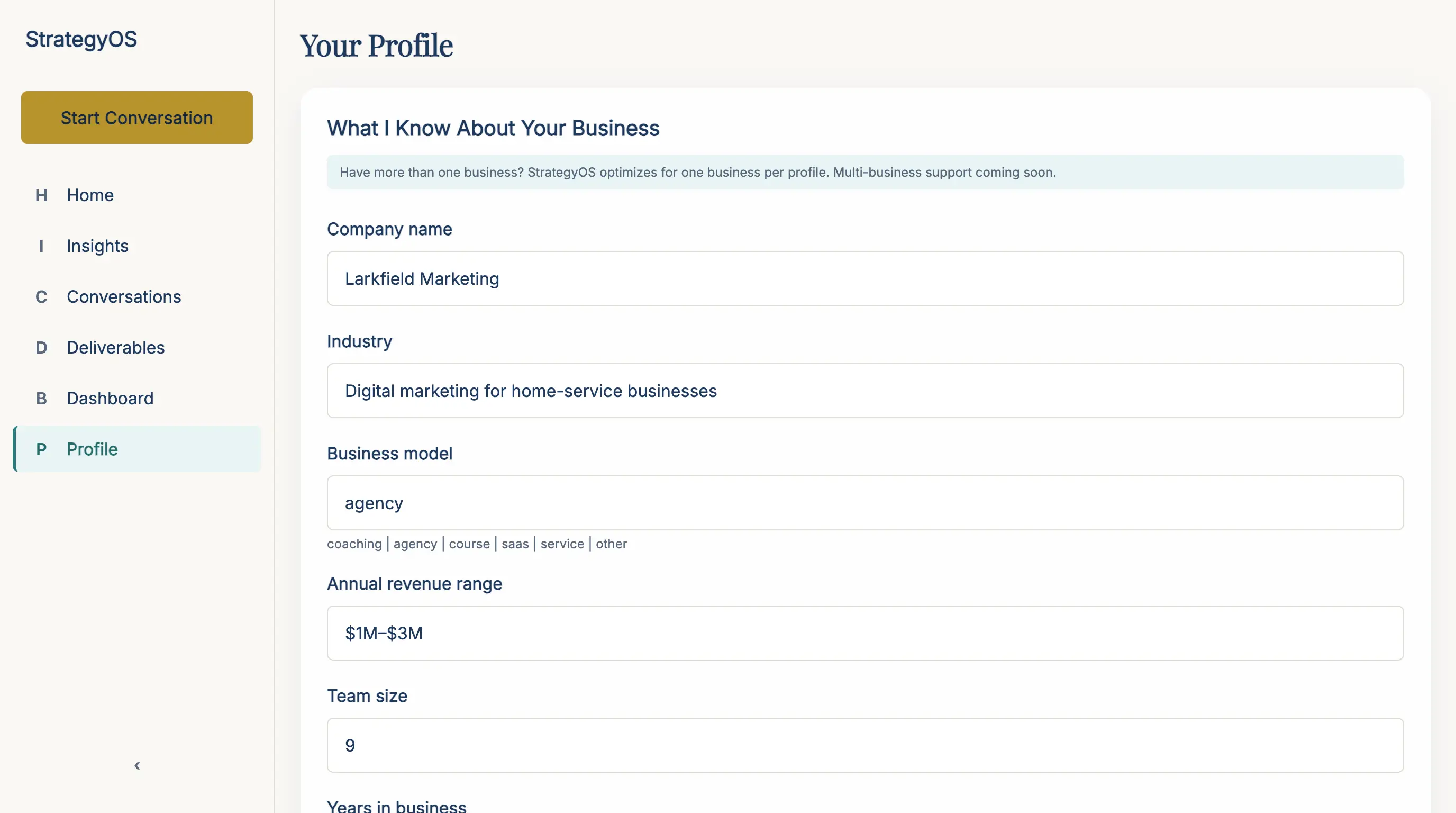
You answer 14 short screens, with one question on each. They ask about your kind of business, its name, how much money comes in, and your team. One asks for your #1 bottleneck: the one thing that, if it moved, would move everything else. Others ask what you’ve tried and what a win looks like in 90 days. Eleven are a tap or two, and three need a few words. Your answers end up in your profile, shown here, and you can change any of them later.
Ask it a real question
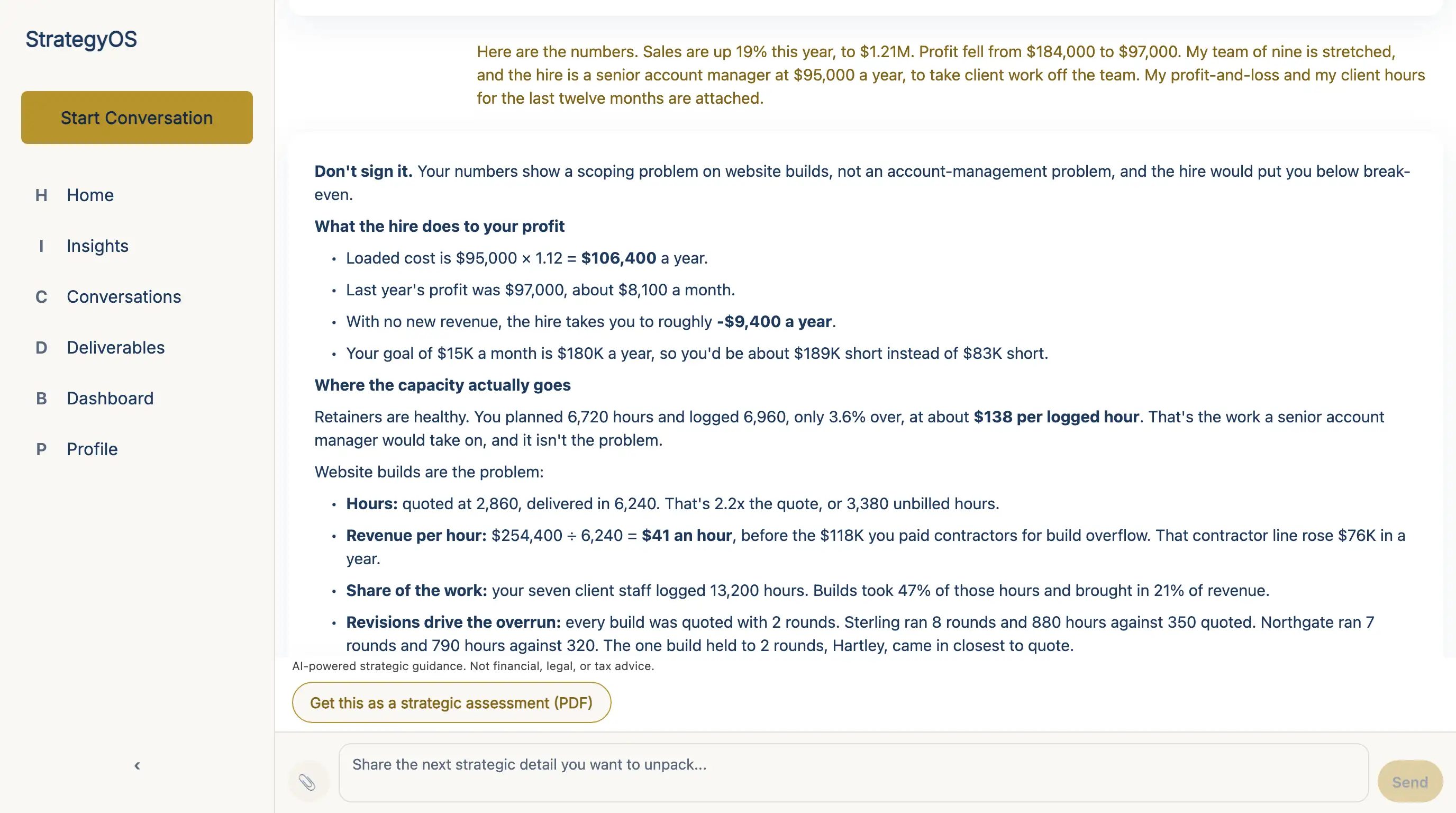
Next, it shows your starting point and your 90-day goal. Then it speaks first. It greets your business by name, says back your bottleneck and your goal, and asks its first question. After that, ask what’s on your mind in your own words. You can attach your own files, too, like a profit and loss sheet. The screen shows Nina’s question, and the answer it worked out from her numbers.
Hear the other side, then decide
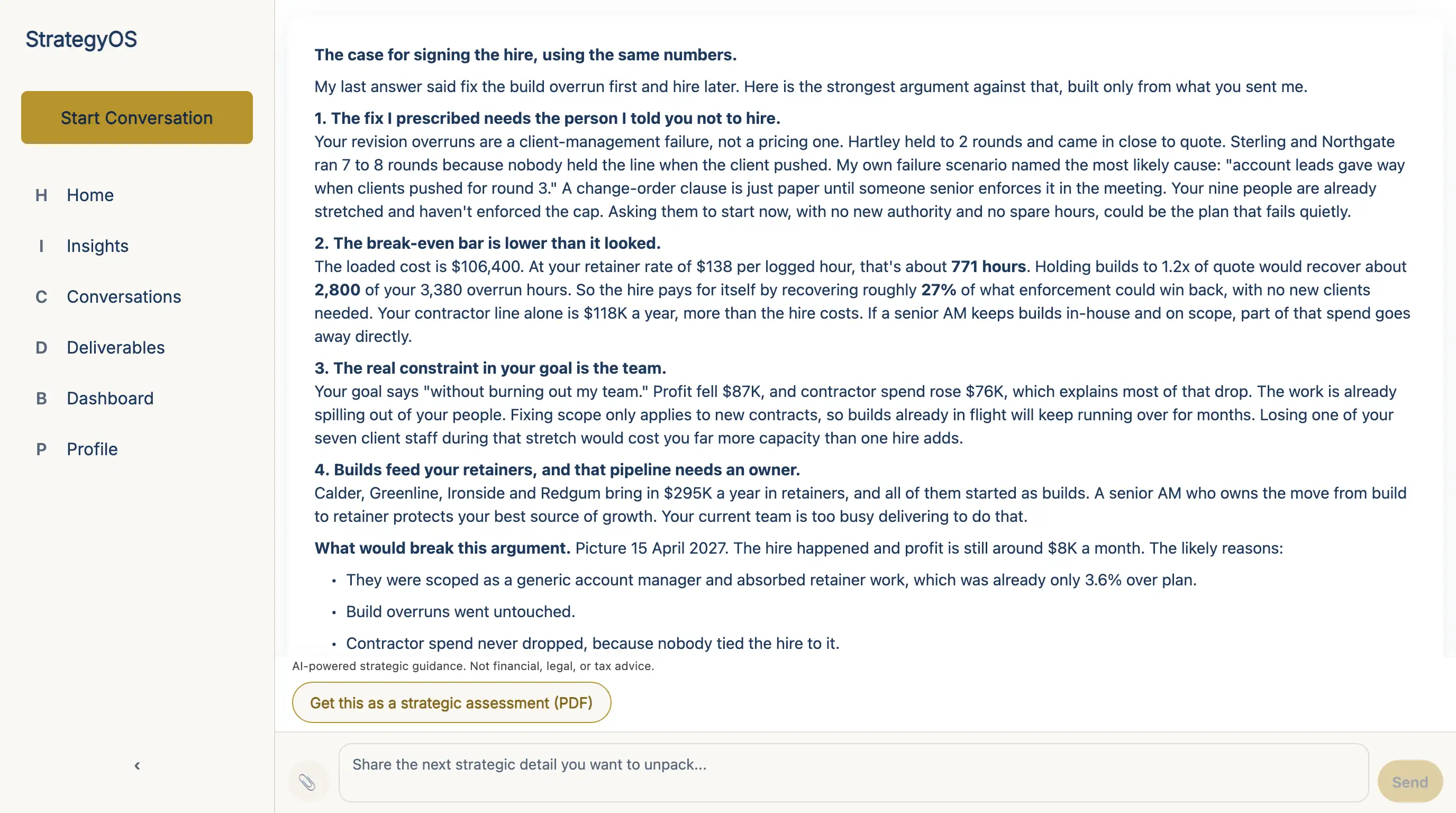
On a big decision, tap Get a second opinion. The same strategist then argues against its own advice, and tells you where it lands. Here it made the case for Nina’s hire, from her own numbers. After that, the call is yours. Tell it what you’ve decided, and what would show you got it wrong.
You get work you can act on
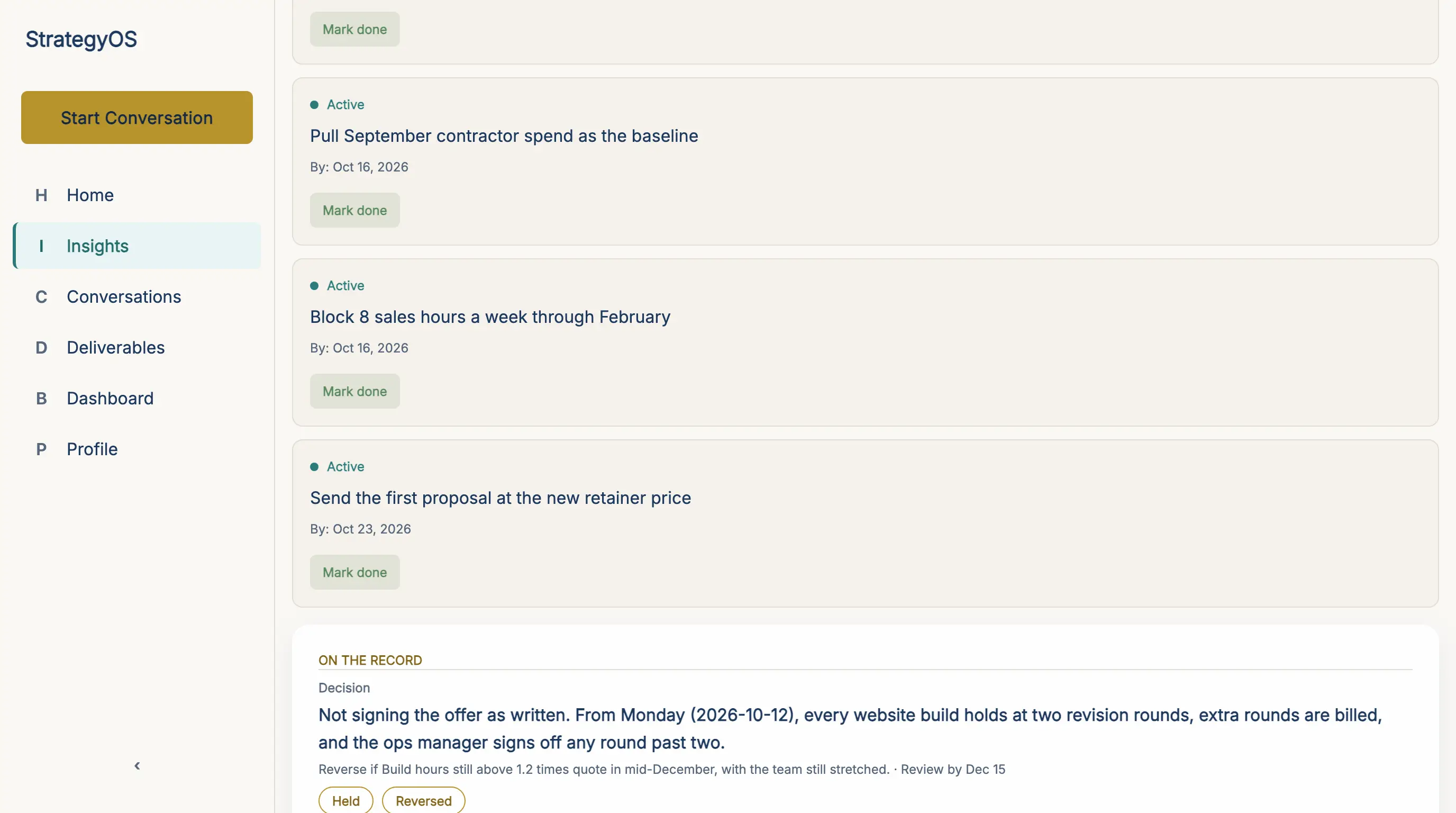
In the app, the Insights tab holds your plan, its actions and your decisions. It’s there from day 1. Nina’s decision went on the record, with the sign that would reverse it and a date to check. When that date comes, it asks her if it held. Ask for a plan around a money goal, and its actions land here with dates. Tap Mark done as you finish each one, and tap Download as PDF to take your plan with you. Each weekly briefing points to your next action.
Now, back to Nina’s desk at 9:40. You’ve just seen her question and her answer on the screens above. This is how her night ended.
She was sure she needed more hands, but StrategyOS didn’t start there. It read her numbers and told her not to sign. Her website builds took 47% of the team’s hours, and they brought in 21% of the money.
Then it asked her one thing. Why did those builds run to 8 rounds of changes? She knew why. Nobody was holding the limit.
So she made the call. From Monday, every build stops at 2 rounds, and extra rounds get billed. She set a date to check if she was right.

She put the letter back in its folder, unsigned. The hire could wait until that date.
What your first 2 weeks look like
That’s day 1, and the days after it build on it. It gets more useful the longer it knows you, so some parts only show up later.
Day 1
You start the 4 steps above. You tell it about the business in your own words. It asks sharp follow-up questions, the way a good strategist would, and starts to build a picture.
Day 2–3
You bring it a real decision, like a price, an offer or a channel that’s gone flat. It works from your numbers and tells you where the facts are thin. If you want a document to keep, tap Get this as a strategic assessment (PDF) under the conversation.
Day 4–7
It asks fewer questions and gives more direction. It starts to link this week to what you told it last week. And it starts checking on your actions.
Week 2 onward
From day 14, the dashboard can show up, once you’ve also sent it 5 messages. By then, your weekly briefing is coming in too.
Where it looks first
Through all of that, it does one more thing: it looks for the questions you didn’t think to ask, the way it did for Nina. It starts with the #1 bottleneck you picked in step 1. From there, it looks in places like these.
The real bottleneck
It checks the one thing that holds everything else back, which may not be the one you picked.
Where the money slips out
It looks at your price, your sales steps, and customers who don’t come back.
How the price is built
It checks if your offer is priced for what it’s really worth.
How the value lands
It checks if buyers see the value before they ever see the price.
Your biggest lever
It looks for the one change that would move the most, for the least work.
What each new customer costs
It checks if each new customer brings in more than it cost to win them.
Then it tells you what to do first, from your own numbers.
How it compares with other help
You may be wondering how this is different from the help you use now. There are 4 places you could take a big question. A peer advisory board, if you haven’t met one, is a group of owners who meet to advise each other. The table puts all 4 side by side. Read across each row to see how they compare on the things that matter most.
| What matters | StrategyOS | General AI chat | A business coach | A peer advisory board |
|---|---|---|---|---|
| Knows your numbers | Permanently, across every conversation | Only what you paste in, each time | What they remember from the last call | What you present to the room |
| AvailabilityWhen you can ask | Any hour | Any hour | Weekly calls | Monthly meetings |
| Shows its reasoning | Yes: the logic, from your figures | Sometimes, unprompted | Varies by person | Group opinion |
| ConfidentialityWho sees what you share | Private to your account | Depends on the plan | One-to-one | Shared with the group |
How your numbers stay safe
Now you know how it compares. Before you put real numbers into it, it’s fair to ask who else can see them. Here are the 4 ways they’re kept safe. Each one is in plain words, with the tech detail beside it.
row_level_security: ON · tested in CIYour numbers are locked to your login.
Every row you add is tied to your account, right down in the database. Our tests check this again on every release. The database won’t show your business to anyone else.
shared_index: your data NOT includedYour business never goes into our shared library.
The AI searches a library of our own business know-how. Your sales, offers and plans are never added to it. They stay in your own rows, and they’re used only to advise you. They’re never sold. And the AI companies we use can’t train on them: their business terms forbid it.
payments → stripe.com · PCI DSS L1We never see or store your card number.
You pay on Stripe’s own secure page. Stripe is certified PCI DSS Level 1, the top card-safety rating there is.
AES-256 at rest · TLS in transitIt’s encrypted, and you can leave with all of it.
Your data is encrypted when it’s stored and when it moves. It sits on SOC 2–certified servers (Supabase on AWS). You can export all of it as a file, any time. Or delete your account, and your personal data goes with it.
It’s boring, proven security.
Who it’s for, and who should skip it
Now you know what it does, how it compares and how your numbers stay safe. But it won’t suit everyone, and I’d rather tell you now. Read both lists: if the first one sounds like you, it was built for you. If the second one does, please skip it.
It’s built for you if…
- You run a coaching, consulting, course, agency or service business. About $100K–$3M a year comes in.
- You have real customers and real sales, so there are real numbers to work from.
- You make the decisions yourself, and you want the reason along with the answer.
- You’d rather hear the hard truth than be agreed with.
Please skip it if…
- You haven’t made money yet, or you’re still at the idea stage. It needs real sales to work from, so come back when you have some.
- You want a free chatbot. This is a premium tool, and it’s priced like one.
- You’re well past $3M. At that size, the work shifts to building the team and deciding where the money goes.
- You want someone to run the business for you. It gives advice, and you decide.
Want to see what it says about your numbers?
Setting it up takes a few minutes. The price and the free trial are just below.
Start your 3-day free trial3 days free on the yearly plan · cancel anytime
What it costs, and how to try it free
There are 3 ways to pay, so pick the one that suits you. Every plan gets the whole strategist, with every part you read about above. Only the way you pay is different.
Pick one plan
Weekly
$49
per week
Pick this for a short push on one problem, paid week by week.
Yearly
$997
per year · about $83/mo
Pick this if you’d like to try it first. It comes with the free trial, which is set out just below.
Monthly
$147
per month
Pick this if you’d like to pay as you go, one month at a time.
Prices in USD. Subscriptions renew automatically until cancelled, and you can cancel any time from inside the app — cancelling stops the next renewal and you keep access until the period you have paid for ends.
How the free trial works
It’s on the yearly plan only. You add a card, and you’re not charged until day 4. Cancel inside the first 3 days, and you’re never charged.
Why only the yearly plan? Because that’s the one you pay for a year at a time. So it’s the one where you should see it work before you pay. Weekly and monthly bill straight away, and you can cancel either one before the next bill.
The yearly plan works out to about $83 a month, under $3 a day.
“Will this work for a business like mine?”
Fair question, and I’d ask it too. If you saw yourself in the first list above, it was built for numbers like yours. If you saw yourself in the second list, please save your money. The honest way to find out is the 3 free days on the yearly plan. Put your real numbers in, and ask the question you’ve been putting off. Then you’ll know.
A few last questions
You’ve seen what it does, how your data is kept safe and what it costs. Here are 4 last questions I’d want answered, too.
Will this replace my team or my advisors?
No, and I wouldn’t want it to. It works beside the people who know your market. Where it helps most is memory: it keeps what you’ve told it on file. It’s there late at night, and you never have to catch it up.
Will it give me legal, tax or investment advice?
No. It knows where its lane ends. Ask it to write a contract, pick a tax position or choose an investment. It will tell you to take that to a lawyer, an accountant or a registered adviser. It gives you strategy, and the final decision is always yours.
How do I cancel?
From inside the app, in a couple of clicks. There’s no email to send and no call to sit through. Cancelling stops the next bill. You keep access until the time you’ve paid for runs out.
Is there a mobile app?
There isn’t one yet. The full product runs in your web browser on any device, your phone included. There’s nothing to install.
Why I built it
I promised I’d tell you why I built StrategyOS, so here it is before I sign off.
I felt that small and mid-sized businesses weren’t being served well by the good and great business consultancies. That was most true for small businesses and the people who start them.
There are a lot of good consultants for very big companies. At the small end, there wasn’t anything at that level. There were only courses and things like that, so owners were left to work it out by themselves.
I needed that help, too. I’ve needed a lot of help from mentors and consultants in business, and at that level, there just wasn’t any.
I didn’t want to mess around with general AI chat tools, either. They’re good, but without context and frameworks, they’re not great.
So I built the strategist I wanted. It’s a top-level business strategy app, and it has your context and the frameworks behind it. I built it for entrepreneurs like the ones I work with, and for myself.
The whole thing, in four lines
That’s the whole letter. You’ve seen what it is, how you get started, who should skip it, and what it costs. If you only remember four things, make it these:
- It keeps your whole business on file: every number, every decision.
- It finds the bottleneck that costs you the most, and names it.
- It turns the answer into a plan with dates on it, then follows up.
- It draws on top consulting firms, today’s best business thinking and my own 20+ years.
Your next big call will probably land late, on some ordinary night, the way Nina’s did. When it comes, I’d like you to have your numbers and a straight answer at the table. Try it once with your real figures. I think you’ll be glad you did.
To your next good decision,
David Cameron Gikandi
P.S. If you take one thing from this letter, take this. Tell StrategyOS your numbers once. Every answer after that starts from them, shows its work, and names the next move, even at 9:40 at night.
P.P.S. The yearly plan starts with 3 free days. Put your real numbers in. If it isn’t for you, cancel inside the 3 days, and you won’t pay a cent.
3 days free on the yearly plan · cancel anytime